
The workshop software that also picks up the phone.
Scheduling, work orders, parts and invoicing in one system. And it also answers the phone and WhatsApp, booking the appointment into a real free slot.
30-day pilot, no lock-in, with data migration included.
Calls answered
5,266
The agent picked up the phone
Invoices issued
1,810
From the work order
Reconciled with suppliers
115,000 €
Invoices checked against their delivery notes
Call flow
5,266 total
- Resolved by the agent
- 3,773
- Passed to the workshop when needed
- 1,493
- Data
- Stored in the EU
- Compliance
- GDPR
- Invoicing
- Verifactu
- Channel
- WhatsApp Business
The problem
The phone rings while you're under a car.
Someone has to answer it. And when nobody can, what you lose isn't the call: it's everything that would have come after it.
Any given Tuesday
- Missed call
The call nobody picks up
The customer calls the next workshop on the list. You never even find out they called.
- Double booking
The appointment written down wrong
A note on a scrap of paper, a stray WhatsApp, two cars booked for the same time.
- Customer not told
The finished car nobody calls about
It takes up space, delays the next job coming in and pushes back getting paid.
- Paperwork pending
The paperwork left for the end of the day
The day's delivery notes still not entered, and the supplier invoice nobody has time to check against what actually arrived.
None of these four is the workshop's fault. It's what happens when the front desk and the admin depend on someone having their hands free, or on a spare hour after closing.
The difference
It's not just another workshop program. It's the front desk and the management in one place.
Workshop programs don't pick up the phone. AI receptionists can't create the order or the invoice, because they aren't the system the workshop runs on. Motryx is both.
Without Motryx
With Motryx
Without Motryx
A phone that rings and nobody answers
With Motryx
Calls answered straight away
Without Motryx
Appointments in a notebook or on WhatsApp
With Motryx
A synced schedule
Without Motryx
"Is my car ready yet?"
With Motryx
Automatic notice and coordinated pickup
Without Motryx
Calling the parts supplier for every order
With Motryx
Supplier orders from the work order itself
Without Motryx
Delivery notes entered by hand
With Motryx
Photo of the delivery note, OCR, and invoices checked against it
Without Motryx
Services and ITV inspections if someone remembers
With Motryx
Motryx spots them, reminds the customer and books it
Without Motryx
Quotes and invoices by retyping data
With Motryx
Both come from the work order
Listen
This is Motryx picking up the phone. The call we open our demo with, in full.
It's the conversation that opens our product demo, complete and uncut: the voice Motryx really answers with, handling a call from start to finish. It ends with the appointment booked and the work order created.
Demo call · Real agent voice · English
CustomerHi, my engine warning light has come on and I wanted to bring the car in for you to check.
What ended up in the system
- Appointment
- Thursday, 18:00
- Service
- Engine check and oil change
End to end
One call. Four things you no longer do by hand.
This is the call you just heard, followed through the system. The plate number goes in once and is never typed again.
- Customer
- Laura Smith
- Reason
- Engine check and oil change
- Channel
- Incoming call
- Plate
- Captured on the call
- Appointment
- Thursday, 18:00
- Mechanic
- Carlos García
- Estimated duration
- 90 min
- Service
- Engine check and oil change
- Order
- OT-2481
- Job
- Engine check and oil change
- Assigned to
- Carlos García
- Vehicle
- Audi A1
- From the order
- OT-2481
- Labour
- Already recorded
- Materials
- Already recorded
- Total
- €59.00
The product
What your team sees every morning.
Recordings of the real system, no mock-ups.
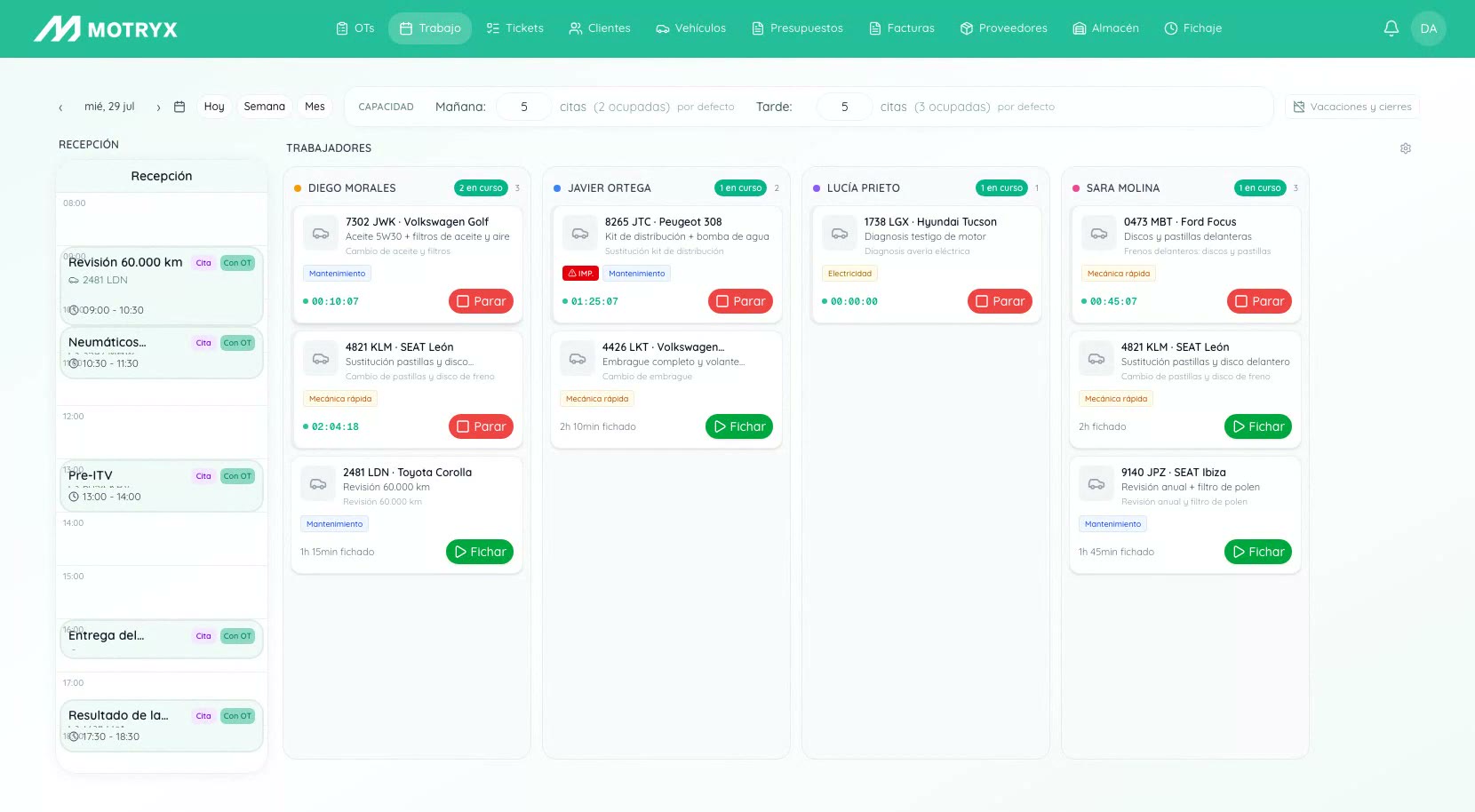
Schedule
Real slots, per mechanic
The schedule knows who is free, how long each job takes and what's already booked. Motryx only offers slots that exist, so two cars never end up booked for the same time.
- Duration per service type
- Workload spread across mechanics
- Changes and rescheduling logged
Work orders
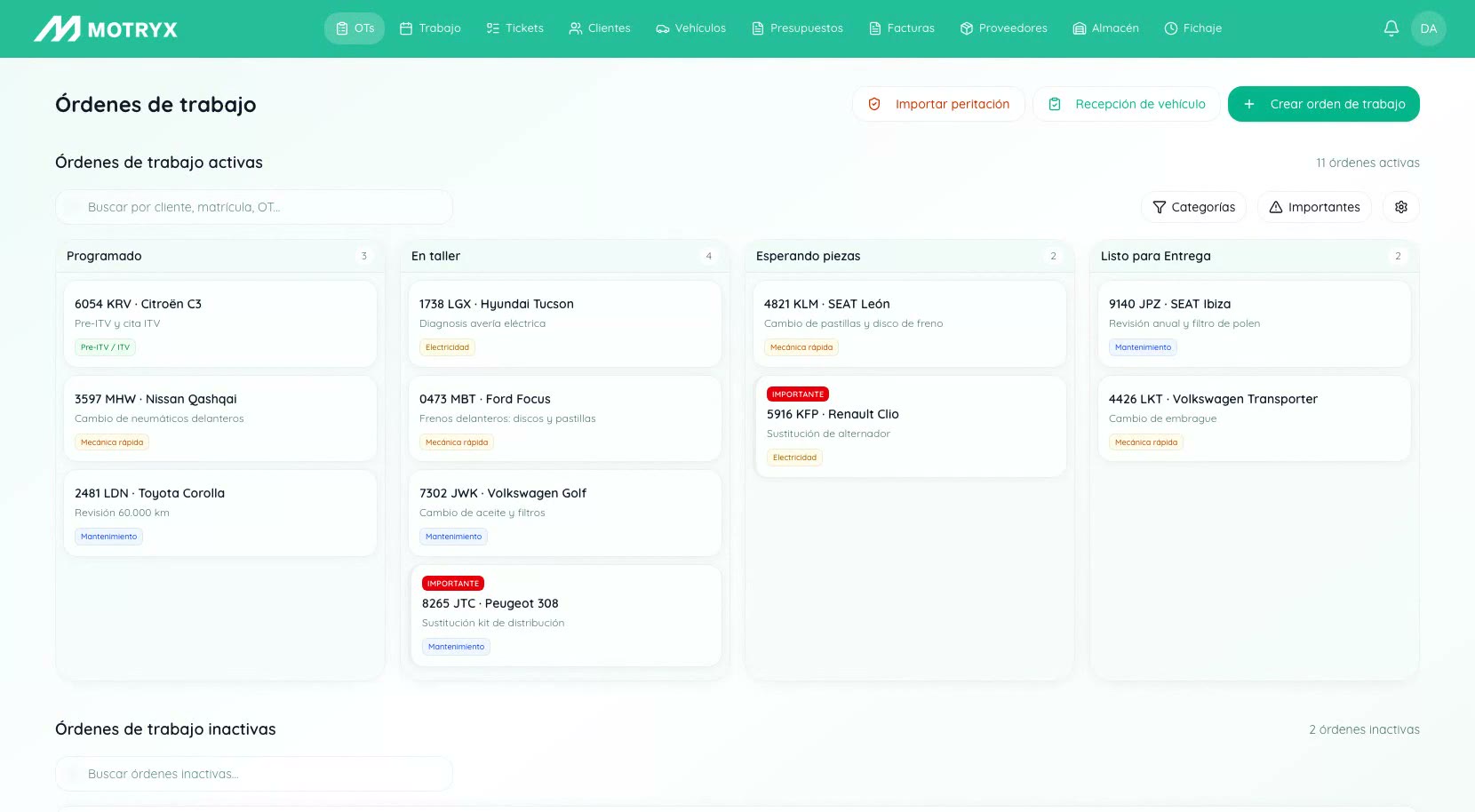
Every car, in its status
The order is created from the conversation and moves across the board. At any moment you know which car is waiting for parts, which one is ready and which one has been taking up space for three days.
- From the call to the work order without retyping anything
- Quote and invoice from the same order
- The customer is notified when the car is ready
And in the same system
Operations
- Calls and WhatsApp
- Schedule per mechanic
- Work orders
- Customers and vehicles
- Workshop Mode for mechanics on the floor
- Time clock
Parts and suppliers
- Supplier orders from the work order
- Delivery note OCR
- Automatic invoice reconciliation
- Stock
- Returns to suppliers
Invoicing
- Quotes and invoices
- Verifactu
- Payments
- Service and ITV inspection reminders
Hands-free
Your mechanics won't use a computer. They don't have to.
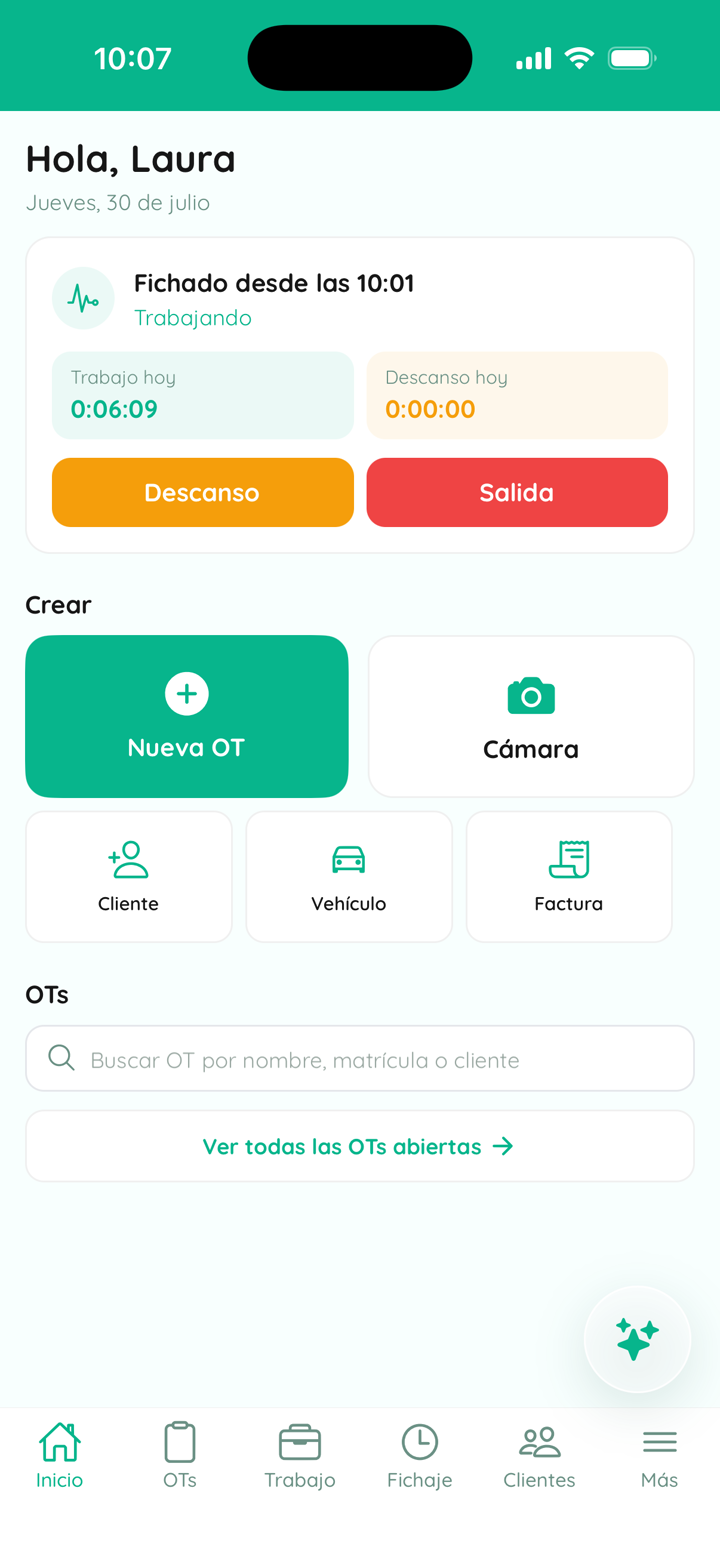
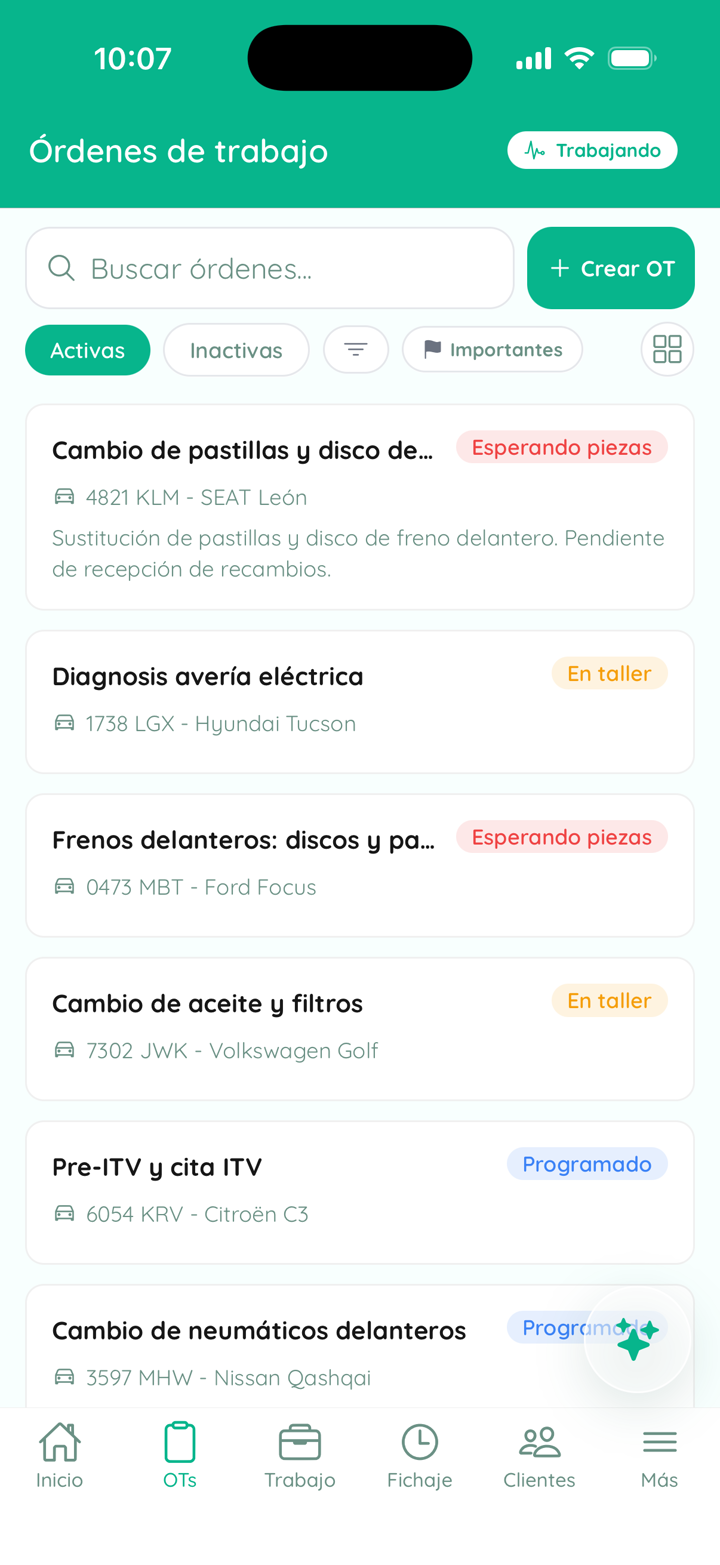
A native app for iOS and Android with the whole workshop inside. And when a mechanic's hands are full, they talk instead of typing.
Dictate what's been done
Parts fitted, time and notes, right then and without leaving the car. What isn't written down on the spot gets written down wrong later, or not at all.
Log the surprise
They take the wheel off, see the worn discs and dictate it. It goes to the customer as a quote extension before anything is put back together.
Ask without putting the tools down
What that car needs, whether the customer approved the change, whether that part is in stock. The alternative is washing up or shouting to the front desk.
And if they need to create a work order, a customer or order a part, they can do that too.
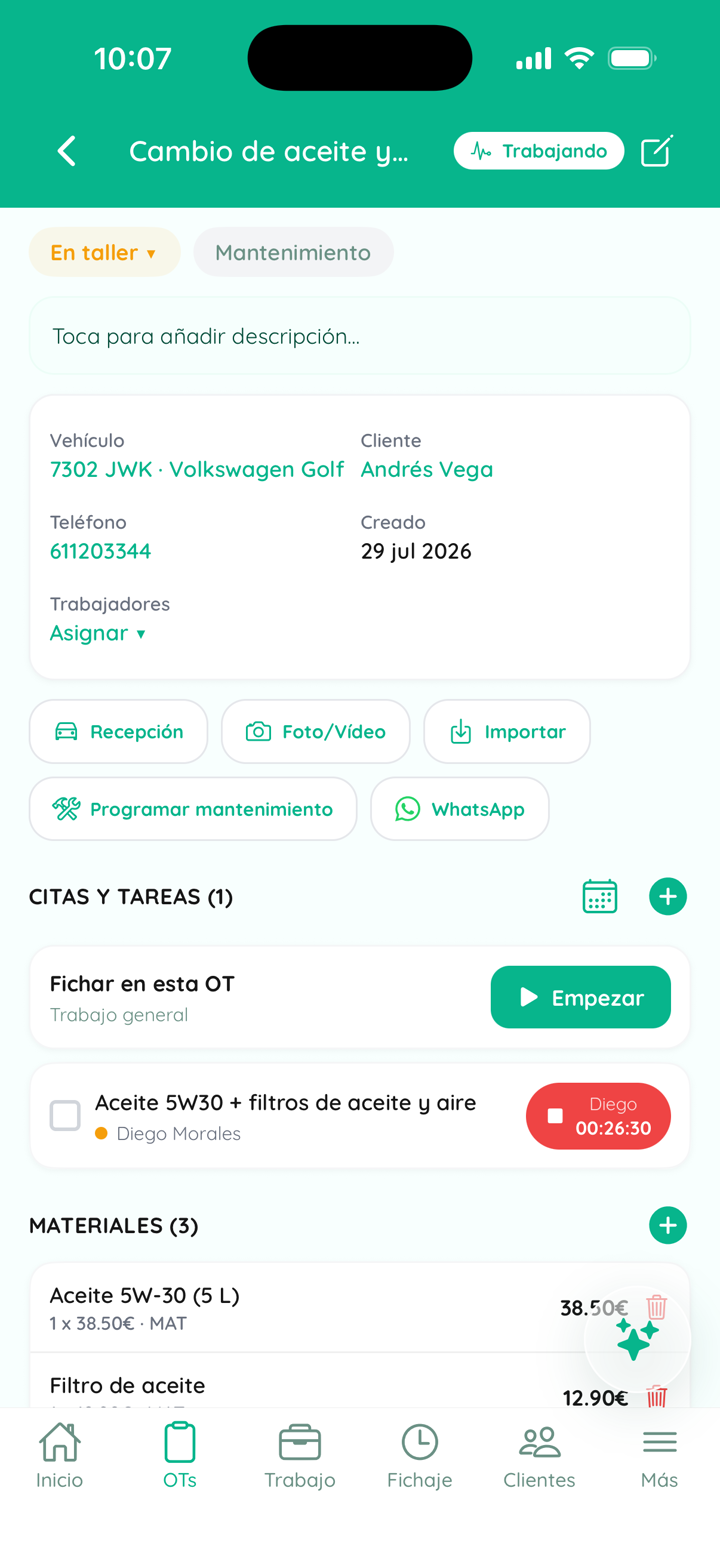
The parts cycle
The column that empties itself.
Waiting for parts
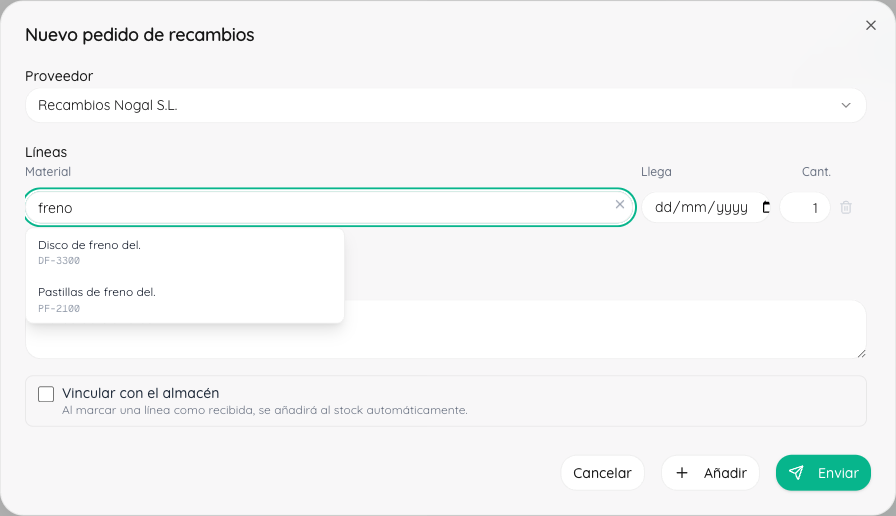
The pain isn't ordering parts. It's the bay blocked by a car waiting on a part, the wrong reference that has to go back, and the call to the parts supplier to ask if they have it. Motryx closes the whole cycle from the work order itself.
- 01
You order from the work order
You send the order to the supplier from the work order itself, without calling or looking up references by hand.
- 02
The delivery note comes in by itself
No typing and no paperwork: lines and prices arrive already loaded into the system.
- 03
The monthly invoice is checked for you
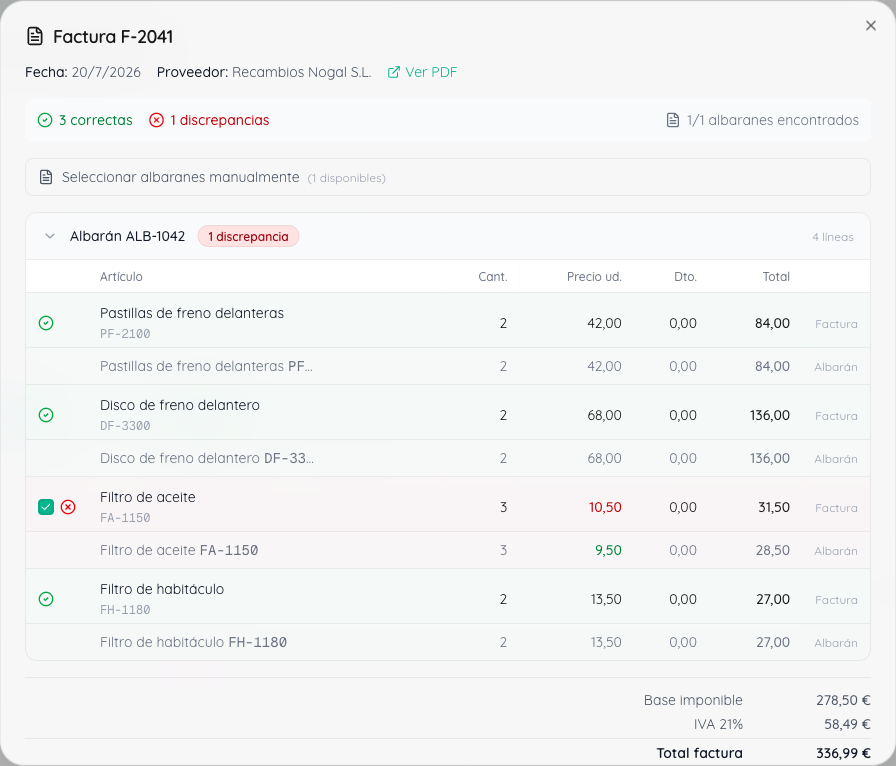
Motryx compares the supplier invoice against every delivery note received and shows the discrepancies line by line, in euros.
- 04
The message to the supplier is one click away
With the differences itemised and the correction ready to send.
Verifactu
Verifactu becomes mandatory in Spain in 2027. With Motryx it's already taken care of.
Verifactu compliance is included, and invoices come out of the same flow you already use for orders, quotes and customers. It's not another program or a separate process.
See Verifactu for workshops (in Spanish)
The whole workshop in one system. The phone too.
Getting started
Less than a day. And we do it for you.
- 01
We connect your channels
We activate your number, set your opening hours and decide when Motryx answers and when it passes the call to a person.
- 02
We set up how you work
Services, how long each job takes, scheduling rules and the initial migration of customers and vehicles.
- 03
It starts answering and logging
Every call ends in an appointment, a ticket or a transfer. And everything is recorded.
Your mechanics only need the phone they already carry.
Pricing
Try it in your workshop first
Thirty days with the full platform and the front desk switched on, set up with your hours and your services. No lock-in, with data migration included.
Book a demoThe price depends on
- The size of the workshop and the number of users
- The channels you switch on: calls, WhatsApp and email
We agree the final price with you in the demo, with no commitment, no surprises and no lock-in.
Questions
Frequently asked questions
What does Motryx do in the workshop's day-to-day?
It brings all of the operation together: scheduling, work orders, customers, vehicles, parts and invoicing. And it also answers calls, WhatsApp and email, turning those conversations into appointments or orders inside the system.
How do I move my data from the program I use now?
We take care of it. We migrate your customers, vehicles and history from your current program, from Excel or from paper, and have it all loaded before you start. Migration is included in the setup.
Does Motryx comply with Verifactu?
Yes. Verifactu compliance is included, and invoices come out of the same system you use for orders and quotes, without adding another program.
How do delivery notes and parts orders come in?
You order parts from the work order itself, the delivery note enters the system without typing, and at the end of the month Motryx checks the supplier invoice against the delivery notes received. In the demo we look at how it fits with your suppliers.
Can I give each person on the team different permissions?
Yes. Each user has their own role and only sees what's relevant to them: front desk, workshop, admin or management. Mechanics work in Workshop Mode, without touching the admin side.
Do my mechanics need a computer to use Motryx?
No. They have a native iOS and Android app with everything they need on the floor, and when their hands are full they dictate the work instead of typing. The phone they already carry is enough.
Does Motryx replace the front-desk team?
No. It takes the repetitive work: answering questions, offering appointments, updating information and following up. When a person is needed, it hands the conversation to the workshop. The idea is fewer interruptions, not taking control away from the team.
What if the customer wants to talk to a person?
Motryx hands the conversation to the workshop. The customer is never stuck, and the team only steps in when it adds something.
How long does it take to switch on?
Less than a day, and we do it for you. We set up the workshop's hours, services and rules, and prepare the initial data migration.
What's included in the pilot? Is there a lock-in?
The pilot includes the full platform, the front desk switched on and the initial setup. It's free for 30 days with no lock-in.
Get started
Try it for 30 days in your workshop
We set it up with your hours, your services and the way you work, so you can see whether it really saves you time.